Getting started with AutoQASM
In this notebook, we demonstrate how to write and execute a quantum program with AutoQASM, using Bell state preparation as an example.
[1]:
# general imports
from collections import Counter

import matplotlib.pyplot as plt

# AutoQASM imports
import autoqasm as aq
from autoqasm.instructions import cnot, h, measure

# AWS imports: Import Braket SDK modules
from braket.devices import LocalSimulator
Build and run a Bell state program
As a hello-world example, we create a Bell state and execute it on the Braket local simulator. The quantum program is defined in the bell_state function. The @aq.main decorator marks the bell_state function as a quantum program and enables AutoQASM syntax in the function scope.
[2]:
@aq.main
def bell_state():
    h(0)
    cnot(0, 1)
    return measure([0, 1])
The quantum program is defined by the decorated bell_state function. You can view the generated OpenQASM script with the to_ir() method. This can help you debug if you are already familiar with OpenQASM.
[3]:
print(bell_state.build().to_ir())
OPENQASM 3.0;
output bit[2] return_value;
qubit[2] __qubits__;
h __qubits__[0];
cnot __qubits__[0], __qubits__[1];
bit[2] __bit_0__ = "00";
__bit_0__[0] = measure __qubits__[0];
__bit_0__[1] = measure __qubits__[1];
return_value = __bit_0__;
Here we submit the quantum program to the local simulator and obtain the results.
[4]:
device = LocalSimulator("autoqasm")
result = device.run(bell_state, shots=100).result()
counts = Counter(result.measurements["return_value"])
print("measurement counts: ", counts)
measurement counts: Counter({'00': 53, '11': 47})
[5]:
plt.bar(counts.keys(), counts.values())

plt.xlabel("bitstrings")
plt.ylabel("counts")
plt.show()
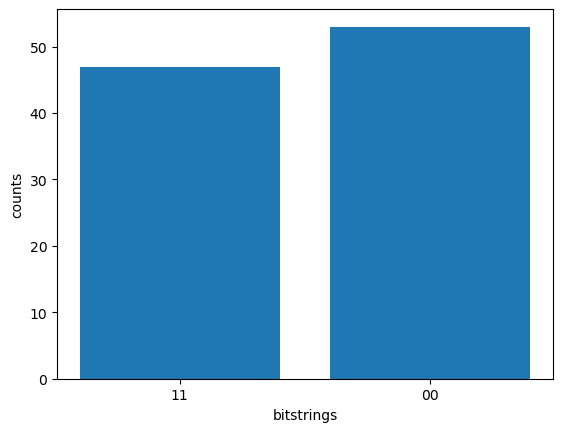
The output shows roughly equal measurement counts of the “00” and “11” bitstrings, a feature of the Bell state.
In this notebook, you learn how to use AutoQASM to compose a basic quantum program. To learn more about composing more complex quantum programs with control flow and subroutines, continue to the next AutoQASM example notebook!